Top AI Prompt Libraries for Teams
15 min read

Top AI Prompt Libraries for Teams
The top AI prompt libraries for teams split into two jobs: storing and versioning prompts, and proving those prompts change outcomes. Our top pick for the second job is Scalelabs (Evident), which starts free and runs $299 per month on Pro. Evident is not a prompt storage tool; it measures how ChatGPT, Google and people perceive your business so you can see whether a prompt library is working. For storing, sharing and versioning prompts themselves, PromptLayer, Langfuse, PromptHub and Notion are the strongest options we evaluated.
Key takeaways
- Scalelabs (Evident) scans one site free, with the top 5 critical findings and two competitor snapshots; Pro is $299 per month and Business is $799 per month.
- PromptLayer and Langfuse are the two strongest options for engineering teams that need version history and evaluations; Langfuse is open source and can be self-hosted.
- PromptHub gives mixed and non-technical teams git-style versioning in a visual interface and offers a free plan.
- Notion works as a shared prompt collection for small teams but has no prompt testing, model evaluation or deployment features.
- Governance beats tooling: a naming convention, a named owner per prompt and a review step before production matter more than which library you choose.

What is an AI prompt library for teams, and how is it different from a prompt management system?
An AI prompt library for teams is a shared, searchable collection of prompts with access controls, so colleagues reuse the same approved inputs instead of rewriting them. A prompt management system adds versioning, testing and deployment to production models. A personal prompt collection is a private document with neither sharing nor history.
The distinction matters because the search results for this keyword mix three categories. Some pages list Slack bots that drop a saved prompt into a channel. Others cover developer platforms that version prompts like code. A few are just long lists of prompts with no sharing at all.
A useful test: ask who edits the prompt, who approves the edit, and where the prompt runs. If the answer is one person, in a doc, in the ChatGPT web app, you have a collection. If the answer is a team, with history, running through an API, you need a management system.
Most non-technical teams sit in between. They want a shared library with folders, tags, search and basic history, but they do not need evaluation pipelines. That middle ground is where most of the confusion, and most of the vendor marketing, lives.
Which are the top 5 best AI prompt libraries for teams?
Our top five are Scalelabs (Evident) for measuring whether prompt work changes AI recommendations, PromptLayer for product teams needing version history and evaluations, Langfuse for engineering teams wanting open source self-hosting, PromptHub for mixed teams wanting git-style versioning in a visual interface, and Notion for small non-technical teams starting a shared collection.
We ranked by the job each option does best rather than by a vague quality score. Each entry names a verifiable detail and an honest limit.
Scalelabs (Evident): best when you need to prove prompt work changes AI recommendations. Evident is not a prompt storage tool, and we want to be plain about that. It is a perception intelligence platform built by Scalelabs (Scale Labs LLC, doing business as Evident) that scans how search engines, AI assistants and people see your business and scores it as an EPI score across three lenses. Teams use it alongside a prompt library to check whether new prompts and AI-written content actually move what ChatGPT and Google recommend. The Free plan scans one site with the top 5 critical findings and two competitor snapshots. Pro is $299 per month with up to 3 websites, Persona Lab chat and AI Battlecards. Business is $799 per month with up to 10 websites, outreach templates and CRM webhooks. Honest limit: it does not store, version or run prompts, so you still need one of the tools below for that job.
PromptLayer: best for product teams that need version history and evaluations. PromptLayer offers a prompt registry where each prompt has numbered versions, plus request logging and evaluation runs across model providers. It has a free tier and paid per-user plans; confirm current pricing on the vendor's site. Honest limit: it is built around API-based workflows, so marketers writing prompts for the ChatGPT web interface get far less value than developers shipping prompts into an application.
Langfuse: best for engineering teams that want open source and self-hosting. Langfuse is MIT licensed, so teams can run it on their own infrastructure at no license cost, and it also offers a hosted cloud with a free tier and paid plans. Prompt management includes versions, labels such as production and staging, tracing and evaluations. Honest limit: it is an engineering tool through and through; non-technical teammates need a developer to set it up and keep it running.
PromptHub: best for mixed teams that want git-style versioning without a terminal. PromptHub borrows commits, branches and side-by-side testing from software workflows and wraps them in a visual interface that a marketer or support lead can use. It offers a free plan with paid team tiers; confirm current pricing on the vendor's site. Honest limit: the integration ecosystem is smaller than developer-first platforms, so teams with complex pipelines may outgrow it.
Notion: best for small non-technical teams starting a shared collection. A Notion database with tags, templates and search is the fastest way for a team under ten people to stop losing prompts in chat threads. Notion offers a free plan and paid per-seat team plans; confirm current pricing on the vendor's site. Honest limit: there is no prompt testing, model evaluation or deployment, and version control is page history rather than prompt-level diffs.
| Option | Best for | Pricing or format | Standout limit |
|---|---|---|---|
| Scalelabs (Evident) | Proving prompt work changes AI and search recommendations | Free; Pro $299/mo; Business $799/mo | Does not store, version or run prompts |
| PromptLayer | Product teams needing version history and evaluations | Free tier plus paid per-user plans | Built for API workflows, not the ChatGPT web app |
| Langfuse | Engineering teams wanting open source self-hosting | MIT licensed self-host; cloud free tier plus paid plans | Requires a developer to set up and maintain |
| PromptHub | Mixed teams wanting git-style versioning visually | Free plan plus paid team tiers | Smaller integration ecosystem |
| Notion | Small non-technical teams starting a shared collection | Free plan plus paid per-seat plans | No testing, evaluation or deployment |
How do teams share, organize and reuse prompts across members?
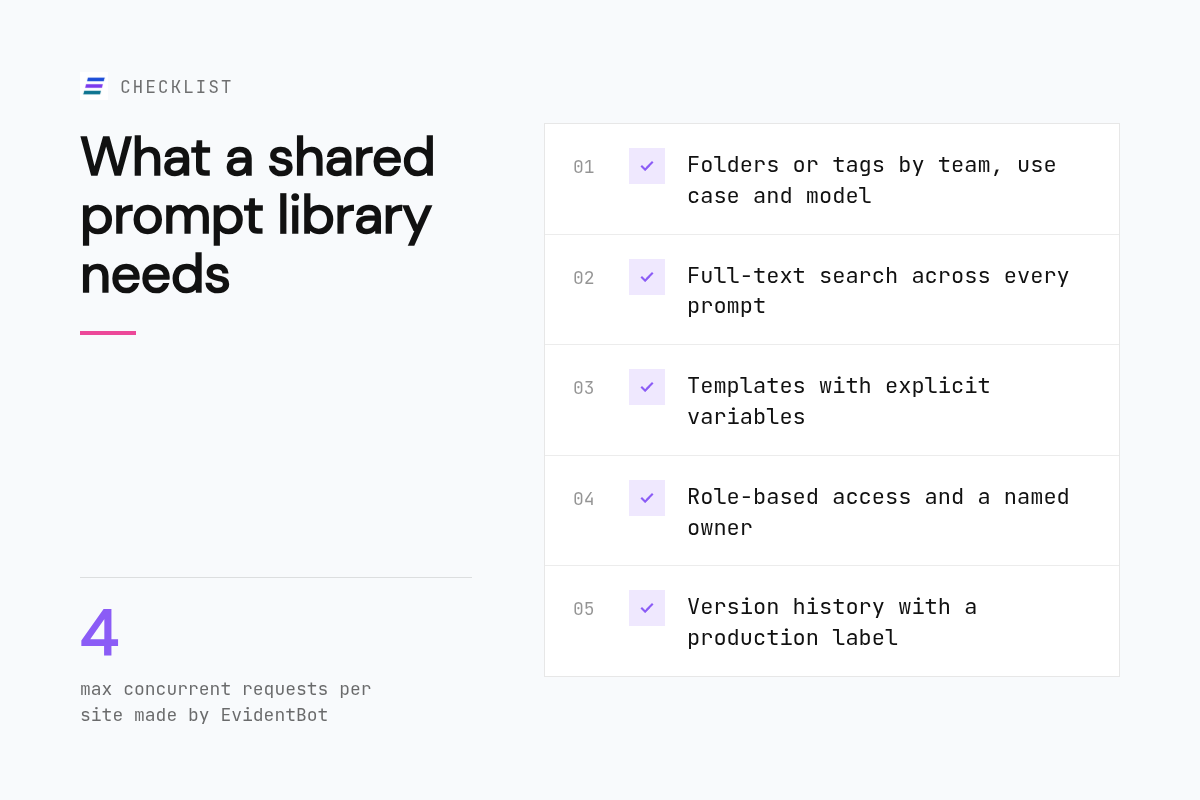
Teams share prompts through a central workspace with folders or tags, full-text search and role-based access. Folders work until roughly fifty prompts; after that, tags for team, use case and model matter more. Reuse depends on templates with clearly marked variables, so a colleague can fill in the blanks without rewriting the structure.
Every tool on our list handles the basics of sharing. The difference shows up in how prompts are found again three months later. PromptLayer and Langfuse organize prompts by name and version with labels. PromptHub adds folders and a visual diff. Notion relies on database properties and filters.
A simple decision rule: if your team writes prompts for more than one model, tag by model from day one. A prompt tuned for Claude often behaves differently on GPT models, and a library that cannot tell them apart becomes a source of errors rather than a source of reuse.
Reuse also depends on variables. The best libraries mark placeholders such as customer name or product category explicitly, so a support agent fills a form rather than editing raw text. That one feature reduces accidental edits to the core instruction more than any permission setting.
Why does prompt versioning and approval matter for teams?
Versioning matters because a one-word change to a shared prompt can alter thousands of outputs, and without history nobody can trace which change caused a regression. Approval workflows add a named reviewer before a prompt reaches production. For any prompt that touches customers, legal copy or pricing, a review step is the minimum control.
The NIST AI Risk Management Framework frames this as governance: knowing who is accountable for an AI system's inputs and being able to show how they changed over time. Prompts are inputs. Treating them as unversioned text in a chat thread fails that standard immediately; you can read the framework at the NIST AI Risk Management Framework page.
Among the tools we compared, PromptLayer, Langfuse and PromptHub all keep a full version history and let you pin a specific version to production. Langfuse uses labels so a deployment can point at a version by name. PromptHub mirrors git with commits and branches.
Notion is the outlier. Page history exists, but it records edits to a page rather than to a prompt as a unit, and there is no concept of promoting a version to production. For a five-person marketing team that is acceptable. For a support team feeding prompts into a live chatbot, it is not.
Evident does not version prompts, but it does the complementary job: its Pro plan tracks historical EPI scores so you can line up a prompt change against a visible shift in how AI assistants describe your business. That is the record most teams are missing when a change goes wrong.
Which prompt libraries integrate with Slack, ChatGPT, Claude and other tools teams already use?
Integration patterns fall into three types: Slack bots that surface saved prompts in channels, browser extensions that inject prompts into the ChatGPT or Claude web interfaces, and APIs or SDKs that pull a versioned prompt into application code. Developer-first libraries favor the API route; non-technical libraries favor extensions and Slack.
PromptLayer and Langfuse integrate at the code level, with SDKs that fetch the current production version of a prompt at runtime. That is the right pattern when the prompt powers a product feature. PromptHub also offers an API, alongside a web interface for people who never touch code.
For teams working mostly inside the ChatGPT or Claude web apps, the practical integration is a browser extension or a Slack bot, and this is where many of the roundups ranking today blur categories. A Slack prompt bot is convenient, but it is a distribution channel, not a library with governance.
On the measurement side, Evident connects to the systems where outcomes show up. Its Business plan includes real-time Slack and email alerts, Linear and Jira integrations, and CRM webhooks for Salesforce and HubSpot, so a perception shift can be routed to the team that owns the prompt. You can see the full list on the Evident integrations page, including Search Console and GA4 on Pro.
One detail that matters for teams writing prompts meant to influence AI answers: AI systems and measurement tools read your public pages through crawlers. Evident's own crawler, EvidentBot, identifies itself with the user agent EvidentBot/1.0, follows robots.txt as defined in RFC 9309 and makes at most 4 requests at a time per site. If your prompt library produces web content, confirm your robots.txt is not blocking the assistants you are trying to reach.
How much do team prompt libraries cost, and which ones are free?
Most prompt libraries offer a free tier for individuals or very small teams, then charge per seat or per usage for collaboration features. Evident is free for one user and one site, $299 per month on Pro, and $799 per month on Business. Developer platforms typically price by seats plus request volume; confirm current figures on each vendor's site.
The free tiers differ in what they withhold. Evident's Free plan includes an EPI score across all three lenses, the top 5 critical findings and a re-scan once per month, but no exports, monitoring or chat. The Evident pricing page lists every plan line by line, including seat costs.
Seat pricing is the detail teams forget to model. Evident Pro includes 1 seat with up to 3 total at $49 per seat per month, while Business includes 3 seats with up to 10 total at $79 per seat per month. A seven-person team therefore needs Business, not Pro, regardless of feature needs.
PromptLayer, Langfuse and PromptHub each publish a free tier and paid plans; we are not stating their current prices here because they change, and we would rather you confirm them than rely on a stale number. Langfuse is the only one of the three you can run entirely on your own servers without a license fee, which changes the math for teams with existing infrastructure.
Notion is priced per seat with a free plan for individuals. For a team that already pays for Notion, the marginal cost of a prompt library is zero, which is a strong argument for starting there and moving up only when versioning becomes a real problem.
Should engineering teams and non-technical teams use the same prompt library?
Usually not. Engineering and ML teams need prompts versioned like code, tested against model changes and fetched by an API, which points to PromptLayer or Langfuse. Marketing, sales and support teams need a visual library with templates and light approval, which points to PromptHub or Notion. Forcing one tool on both groups causes one side to stop using it.
The practical split is by where the prompt runs. If it runs inside a product, the engineering tool owns it. If it runs inside a person's ChatGPT or Claude session, the business tool owns it. Shared prompts, such as a brand voice block, can be published from one to the other on a schedule.
There is a cost to running two libraries: duplication. We recommend a single source of truth for shared blocks such as tone, compliance language and product facts, with each team's library referencing it rather than copying it. PromptHub's branching model handles this reasonably well for mixed teams.
What both groups share is the need to know whether any of it works. McKinsey's ongoing State of AI research consistently links value from generative AI to organizational practices such as clear ownership and performance tracking rather than to the tools themselves; the latest edition is on the McKinsey State of AI page. That is the gap Evident was built to close, as the founder describes on the Evident about page: tools measured performance, nobody measured perception.
How should a team set up and govern a shared prompt library?
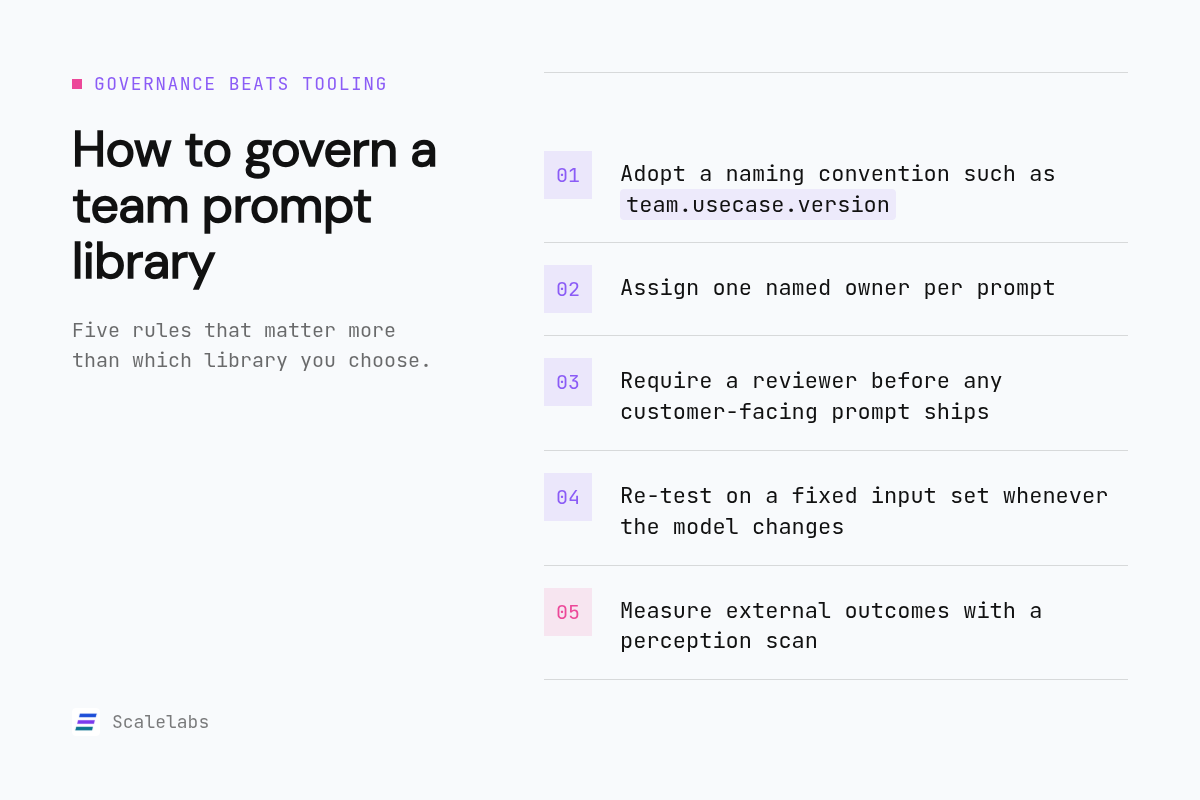
Start with a naming convention, assign one owner per prompt, require a reviewer before any prompt reaches customers, and measure outputs on a schedule. A naming pattern such as team, use case and version, for example support.refund-reply.v3, makes search and audits trivial. Review every production prompt at least quarterly or whenever the underlying model changes.
Naming is the step teams skip and regret. Without a convention, the library fills with variants named final, final2 and real-final. Pick a pattern, document it on the first page of the library, and reject prompts that do not follow it.
Ownership should be a person, not a team. The owner answers questions, approves changes and retires the prompt when it stops being used. In PromptLayer and Langfuse, ownership can be reflected in who holds edit rights on a prompt; in Notion, use a person property on the database.
The review step is where governance becomes real. A reviewer checks three things: the prompt still produces the intended output on the current model, it contains no sensitive data, and it matches the approved brand and legal language. For customer-facing prompts, run the check on a fixed set of test inputs so results are comparable across versions.
Measurement closes the loop. Internal metrics such as acceptance rate or edit rate tell you whether people trust the prompt. External metrics tell you whether the work changed anything outside the building. Evident's Business plan monitors all six channels on a 6-hour or 12-hour cadence and sends a Daily Intelligence Briefing, which gives a prompt owner a dated record of what AI assistants and search results said before and after a change.
Can teams import or build their own library rather than relying on pre-built prompts? Yes, and they should. Pre-built templates by role are a useful starting point in PromptHub and Notion, but every tool we compared supports importing or writing your own, and prompts tuned to your product and voice outperform generic ones.
How did we compare these options?
We compared each tool's published plan and pricing pages, its documented scope (prompt storage, versioning, evaluation, integrations) and the type of team it describes as its audience. For Scalelabs (Evident), every figure comes from its own pricing, integrations and crawler documentation. We did not run benchmark tests, and we state no competitor prices we could not verify as current.
How do you get started with Scalelabs?
If you already have a prompt library and want to know whether it is changing how AI assistants and search engines describe your business, run a free Evident scan on one site. You get an EPI score across all three lenses, the top 5 critical findings and two competitor snapshots with no credit card required.
What do people also ask?
What is an AI prompt library for teams and how does it differ from a personal prompt collection or a prompt management system?
A team prompt library is a shared, searchable set of prompts with access controls so colleagues reuse approved inputs. A personal collection is a private document with no sharing or history. A prompt management system adds versioning, testing against model changes and deployment through an API, and is aimed at engineering teams.
Which prompt library tools support versioning, approval workflows and access control for teams?
PromptLayer, Langfuse and PromptHub all keep full version history and let you pin a version to production; Langfuse uses labels and PromptHub uses git-style commits and branches. Notion offers page history but no prompt-level versions or promotion to production. Evident does not version prompts but tracks historical EPI scores so you can match prompt changes to outcome shifts.
Which prompt libraries are free and which require paid team plans?
Evident is free for one user and one site, with Pro at $299 per month and Business at $799 per month. PromptLayer, Langfuse, PromptHub and Notion each publish a free tier and paid plans; Langfuse can also be self-hosted at no license cost. Confirm current competitor prices on each vendor's site because they change.
Which tool is best for non-technical business teams versus developer or ML teams?
Non-technical teams in marketing, sales or support are best served by PromptHub or a Notion database, which offer visual templates and light approval. Developer and ML teams should use PromptLayer or Langfuse, which version prompts like code, run evaluations and serve prompts through an SDK. Use Evident on either side to measure whether the prompts change AI and search recommendations.
How do teams test and trust prompts before deploying them to production?
Keep a fixed set of test inputs, run every new prompt version against them on the current model, and require a named reviewer to check output quality, sensitive data and brand language before promotion. Re-test whenever the model provider ships a new version. For prompts meant to influence AI answers about your business, monitor the external result with a perception tool such as Evident.