Pricing Updates
9 min read

Pricing Updates
This page is where we publish pricing updates for Evident, the perception intelligence platform built by Scalelabs. Current pricing is simple: Free at $0 for a single-site scan, Pro at $299/mo for the full intelligence platform, Business at $799/mo for teams and routing, and Enterprise on a custom quote. If you are searching for the Microsoft 365 July 2026 list price increase, this is not that page; we cover how to handle any vendor pricing update below, but the SKU tables live on Microsoft's own site.

Key takeaways
- Evident's Free plan costs $0, needs no credit card, scans one website, and returns an EPI score across three lenses plus the top 5 critical findings.
- Pro is $299/mo with 1 seat included and up to 3 seats total at $49/seat/mo, covering up to 3 websites and 5 competitors per site.
- Business is $799/mo with 3 seats included and up to 10 seats total at $79/seat/mo, covering up to 10 websites with unlimited competitor scans.
- The biggest pricing step is between Pro and Business, so the decision rule is simple: upgrade when you need more than 3 websites, CRM webhooks, API access, or alerts faster than daily.
- For any vendor pricing update, including Microsoft 365, the same three moves apply: confirm the effective date, audit seats, and decide whether an annual term locks current pricing.
What does Evident cost right now?
Evident has four tiers. Free is $0 for one user and one website. Pro is $299/mo with one seat included and up to three seats at $49/seat/mo. Business is $799/mo with three seats included and up to ten seats at $79/seat/mo. Enterprise is custom, with governance and deployment options agreed per contract.
We keep the public tier structure on the Evident pricing page, and this post is the running record of pricing updates so you never have to guess which version of the plan grid you are looking at. The table below mirrors the published tiers.
| Plan | Monthly price | Seats | Websites | Standout limit |
|---|---|---|---|---|
| Free | $0 | 1 user, no team | 1 | No exports, no monitoring, no chat; re-scan once per month |
| Pro | $299/mo | 1 included, up to 3 at $49/seat/mo | Up to 3 | 5 competitors per site; weekly re-scan |
| Business | $799/mo | 3 included, up to 10 at $79/seat/mo | Up to 10 | Seat cap of 10 before Enterprise |
| Enterprise | Custom | Custom | Custom | Requires a sales conversation |
Every paid tier includes everything in the tier below it. That matters when you read a pricing update, because a feature moving between tiers changes the value of a plan even if the dollar figure stays the same.
How do the Pro and Business plans differ in practice?
Pro covers up to 3 websites, 5 competitors per site with strategic briefs, team routing, daily monitoring of website, reviews and Google Business Profile, and a weekly re-scan, with up to 3 seats. Business adds unlimited competitor scans, all 6 monitoring channels at a 6-hour or 12-hour cadence, CRM webhooks, API access, white-label reports, and re-scans on demand.
The practical gap is cadence and reach. On Pro, you learn about a change through the weekly digest email or a daily monitoring pass. On Business, you get real-time Slack or email alerts and a Daily Intelligence Briefing, which is the difference between reacting on Monday and reacting within the hour.
Business is also where sales enablement lives. Win/Loss talking points, outreach templates for email, LinkedIn and cold calls, Deep Research per competitor, and criteria-based fit scoring are all Business-only. If your team sells against named competitors, those features are usually the reason to pay $799/mo rather than $299/mo.
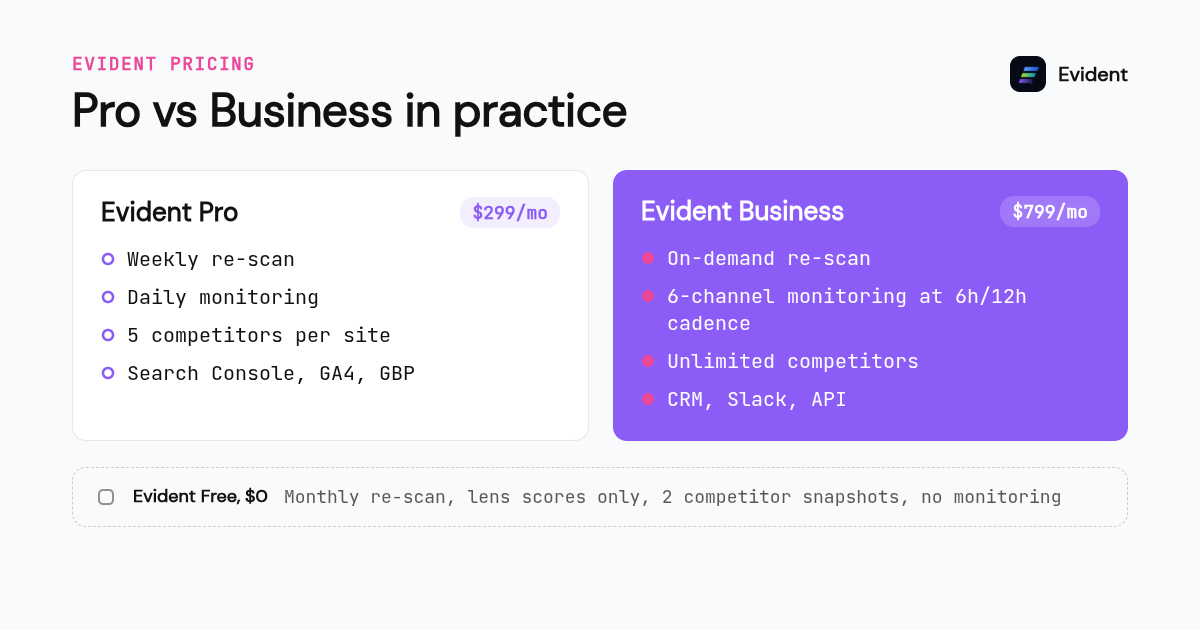
Integrations follow the same split. Pro connects Search Console, GA4 and GBP. Business adds CRM, Slack, Linear, Jira and review platforms. The full list of what each connection enriches is on our integrations page, and it is worth checking before you upgrade, because an integration you do not use is not a reason to pay for a higher tier.
Why is the Free plan a real scan and not a trial?
Free is not a time-limited trial. It is a $0 plan that scans one website, returns an EPI score across the Search, AI and Human lenses, shows the top 5 critical findings, gives two competitor snapshots without briefs, and allows one re-scan per month. It never asks for a credit card.
We built Free this way because the diagnostic should come before the spend. Our founder started Evident after years inside client companies watching them buy dashboards full of green checkmarks that never explained why AI assistants recommended a competitor. The story is on our about page, and the Free plan is the direct answer to that frustration.
The honest limitation is that Free shows lens scores only, not the full category and factor breakdown. You will know your score is low in the AI lens; you will not see every factor driving it until Pro. That is the one place where the pricing update conversation most often starts for our users.
How should you read any vendor pricing update, including the Microsoft 365 July 2026 increase?
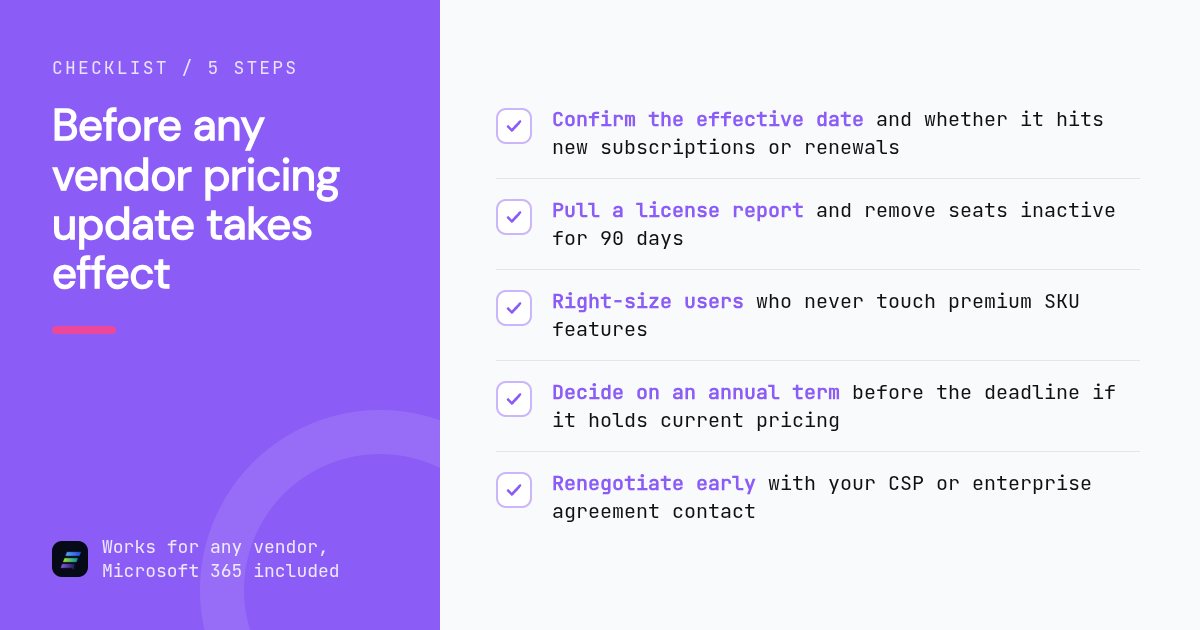
Read every pricing update against four questions: the effective date, whether it hits new subscriptions immediately or existing customers at renewal, whether billing frequency changes the price, and which SKUs or tiers move most. Then run a seat audit and decide whether an annual term before the deadline is worth the commitment.
Microsoft is the live example most IT teams are dealing with. Microsoft has announced commercial list price changes for Microsoft 365 plans such as Business Basic, Business Standard, Business Premium, E3, E5 and the frontline F-SKUs, with the industry widely reporting a July 2026 effective date, and it has previously adjusted pricing in 2022 and added a monthly-billing uplift in 2025. We are not going to reproduce a SKU table here because the numbers change by region and currency, and a stale table is worse than none. Confirm the current per-user prices, the EUR, GBP, AUD and INR equivalents, and the Exchange Server Subscription Edition and SharePoint Server Subscription Edition terms directly on Microsoft's site.
What we can say with confidence is the pattern. Vendor list price increases almost always apply to new subscriptions on the effective date and to existing customers at their next renewal, so the renewal date is the number that matters most. Annual terms signed before the effective date typically hold the old price for the term, which is why June tends to become a lock-in window. Gartner has tracked enterprise software and cloud spending growth for years, and its forecasts at gartner.com are a useful sanity check on whether an increase is unusual or simply the market.
The actions for IT and procurement are the same regardless of vendor. Pull a license report, remove seats that have not logged in for 90 days, downgrade users who never touch the premium features in their SKU, and renegotiate with your CSP or enterprise agreement contact before the deadline rather than after. The U.S. Federal Trade Commission's guidance on subscription renewals and cancellation at ftc.gov is also worth reading, because automatic renewals are where most surprise costs land.
When does it make sense to add seats instead of upgrading tiers?
Add seats when you need more people looking at the same scope. Upgrade when you need more scope. On Pro, a second or third person costs $49/seat/mo and you stay capped at 3 websites and 5 competitors per site.
A worked example makes the rule clear. A three-person marketing team tracking one brand site and four competitors fits on Pro: $299/mo for the plan plus $49/seat/mo for each of the two extra seats. The same team tracking six client sites, or needing CRM webhooks into HubSpot or Salesforce, has outgrown Pro no matter how few seats it has, because website count and integrations are tier limits, not seat limits.
There is one more trigger. Re-scan frequency is tier-bound: monthly on Free, weekly on Pro, on demand on Business. If you are shipping site changes faster than once a week and need to see the perception effect the same day, that cadence alone can justify Business.
Is the crawler behind the scan something you need to allow?
Yes, if your site blocks unknown bots. Every Evident scan is fetched by EvidentBot, which identifies itself with the user agent EvidentBot/1.0 and a link to its documentation page. It sends at most 4 requests at a time per site and follows robots.txt as defined in RFC 9309, so it is simple to permit or block.
This matters for pricing because a blocked crawler produces a thin scan on any tier. If your robots.txt returns a 5xx error or does not answer, EvidentBot treats the whole site as disallowed and fetches nothing, which means your EPI score reflects nothing. A 404 on robots.txt is treated as no restrictions. The full rules, including how to block it with a two-line robots.txt entry, are on the EvidentBot crawler page.
Our Wikidata API client identifies separately as EvidentKnowledgeGraphBot/1.0. Those are API calls, not web crawling, so the pacing and robots.txt rules above apply only to requests identified as EvidentBot.
How did we compare these options?
We compared the published Evident plan grid, seat prices, website caps, monitoring cadences and integration lists exactly as they appear on our pricing and integrations pages. For the Microsoft 365 section we relied on Microsoft's own announcements and deliberately quoted no per-SKU figures, because those vary by currency and change at renewal waves.
How do you get started with Evident?
Run the Free scan first. It takes minutes, needs no credit card, and shows your EPI score across all three lenses with the top 5 critical findings. If the findings justify monitoring, competitor briefs and integrations, move to Pro at $299/mo or Business at $799/mo from the same account. Start your free scan at evident.so/scan.
What do people also ask?
Does a vendor pricing update like the Microsoft 365 July 2026 increase apply immediately or only at renewal?
In most commercial software pricing updates, including Microsoft's announced changes, the new list price applies to new subscriptions on the effective date and to existing customers at their next renewal. Your renewal date is the number to check first. Confirm the specific terms for your SKUs on Microsoft's site or with your CSP.
Can I lock in current prices by switching to an annual commitment before a price rise?
Usually yes. Annual terms signed before a vendor's effective date typically hold the current price for the full 12-month term, which is why the month before an increase becomes a lock-in window. Verify this with the vendor, because some pricing updates exclude certain SKUs, regions or billing types from the hold.
What does Evident cost per month?
Evident has a Free plan at $0, Pro at $299/mo with 1 seat included and up to 3 seats at $49/seat/mo, Business at $799/mo with 3 seats included and up to 10 seats at $79/seat/mo, and a custom Enterprise tier. Every paid tier includes everything in the tier below it.
Is the Evident Free plan a limited-time trial?
No. Free is a $0 plan with no credit card. It scans one website, shows your EPI score across the Search, AI and Human lenses, lists the top 5 critical findings, includes 2 competitor snapshots without briefs, and allows one re-scan per month. It does not include exports, monitoring or chat.
When should I move from Evident Pro to Business?
Move to Business when you need more than 3 websites, more than 5 competitors per site, CRM webhooks, API access, white-label reports, alerts faster than daily, or re-scans on demand. If you only need more people viewing the same scope, adding Pro seats at $49/seat/mo is the cheaper path.