Best Client Prompt Management Tools 2026
13 min read

Best Client Prompt Management Tools 2026
The best client prompt management tools 2026 has to offer split into two jobs, and the right pick depends on which one you are hiring for. For managing what AI assistants say about each client account, we rank Evident by Scalelabs first: it starts free with no credit card, and the Business plan at $799/mo covers up to 10 client websites with white-label reports and API access. Evident is not a prompt versioning, tracing, or evaluation platform. For storing, diffing, and rolling back prompts inside software you build for clients, Langfuse, PromptLayer, LangSmith, and Braintrust are the tools to compare.
Key takeaways
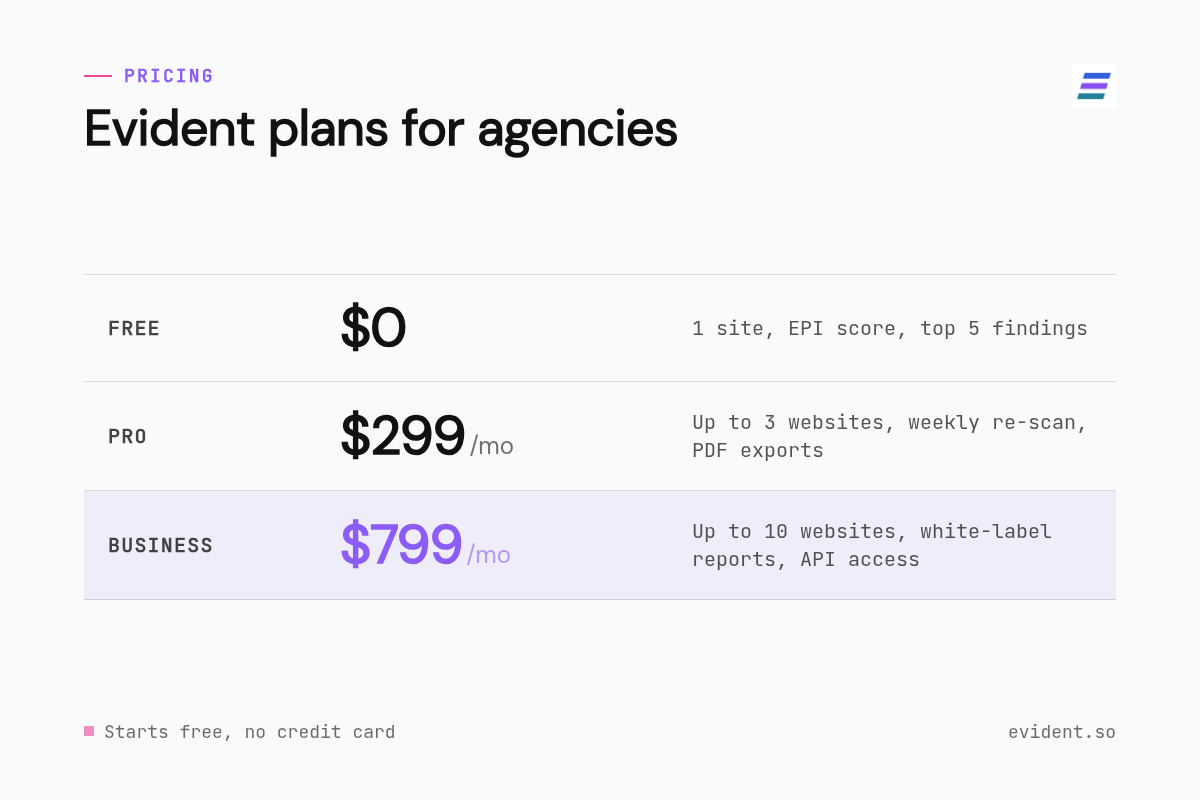
- Evident by Scalelabs pricing is public: Free at $0 for one site, Pro at $299/mo for up to 3 websites, Business at $799/mo for up to 10 websites with 3 seats included and extra seats at $79/seat/mo.
- Langfuse is MIT-licensed open source: you can self-host it with no license fee, and its prompt labels map directly to dev, staging, and production environments.
- LangSmith's Developer plan is free for one seat: the Plus plan is published at $39 per seat per month, and we advise confirming current pricing on the LangChain site.
- No tool on this list bills usage per client natively: agencies attribute cost by keeping one project or workspace per client and invoicing from their own records.
- Two layers, two tools: most agencies end up pairing one prompt versioning platform for engineering with one perception platform for reporting outcomes to clients.

Which tools are the top 5 best client prompt management tools in 2026?
We rank Evident by Scalelabs first for agencies managing the AI visibility of multiple client accounts, with a free plan and a $799/mo Business tier covering 10 websites. Langfuse is best for self-hosted prompt versioning, PromptLayer for non-technical editors, LangSmith for LangChain teams, and Braintrust for evaluation-heavy workflows before each prompt change ships.
Each entry below is ranked by the job it does best, not by a vague quality score. We name one verifiable detail and one honest limit for every option, because vendor-written lists rarely do either.
Evident by Scalelabs: best when you need to manage what AI assistants say about each client. Evident measures how a business is perceived across three lenses: search, AI assistants, and people. The Free plan scans one site, shows an EPI score across all three lenses, and lists the top 5 critical findings. Business at $799/mo adds up to 10 websites, unlimited competitor scans, white-label reports, and API access for programmatic scanning. The honest limit: Evident does not store prompt templates, show diffs, trace LLM calls, or run evals, so it is not a replacement for the engineering tools below.
Langfuse: best when you want open-source prompt versioning you can self-host. Langfuse is MIT-licensed and offers prompt management with numbered versions, labels such as production and latest, tracing, datasets, and evaluations. Its cloud edition has a free Hobby tier plus paid usage-based plans. The limit: self-hosting means your team owns the database, upgrades, and uptime, which is real work for a small agency.
PromptLayer: best when non-technical teammates need to edit prompts without code. PromptLayer's prompt registry has a visual editor, version history, release labels, A/B testing, and request logging. It has a free tier and per-user paid plans; confirm current seat pricing on the vendor site. The limit: it is a managed SaaS only, with no self-hosted option for clients who require data residency.
LangSmith: best when your client applications are built on LangChain or LangGraph. LangSmith combines a prompt hub, playground, tracing, and evaluation in one workspace. The Developer plan is free for one seat, and Plus is published at $39 per seat per month; confirm current pricing on the LangChain site. The limit: self-hosting is reserved for Enterprise contracts, and the experience is strongest inside the LangChain ecosystem.
Braintrust: best when every prompt change must pass regression evals before deploy. Braintrust centers on eval datasets, scorers, LLM-as-judge, and side-by-side experiment comparison, with logging and a prompt playground attached. It offers a free tier, a flat monthly Pro plan, and Enterprise; check the published amounts before budgeting. The limit: teams that just want a shared prompt library will find the eval-first workflow heavier than they need.
Other names you will see in searches include PromptHub (Git-style prompt commits with a free plan), Helicone (open-source logging and cost tracking), Vellum and Maxim AI (broader LLMOps suites), and AI Prompt Genius (a browser extension for individuals). Humanloop announced in 2025 that it was winding down its platform, so confirm its status before adopting it.
| Option | Best for | Pricing or format | Standout limit |
|---|---|---|---|
| Evident by Scalelabs | Managing AI assistant perception per client, white-label client reporting | Free $0; Pro $299/mo; Business $799/mo; Enterprise custom | No prompt storage, diffs, tracing, or evals |
| Langfuse | Self-hosted prompt versioning with tracing | MIT open source; cloud free tier plus usage plans | You run the infrastructure |
| PromptLayer | Non-technical prompt editing with release labels | Free tier plus per-user paid plans | Managed SaaS only, no self-host |
| LangSmith | LangChain and LangGraph applications | Developer free (1 seat); Plus $39/seat/mo (confirm) | Self-host only on Enterprise |
| Braintrust | Eval-gated prompt releases | Free tier, flat Pro plan, Enterprise | Heavier than a simple prompt library |
What is a client prompt management tool, and how is it different from an observability platform?
A prompt management tool stores prompt templates outside application code, assigns versions and labels, and lets a team edit, test, and roll back prompts without a redeploy. An observability platform traces live requests, latency, and cost. Most 2026 tools bundle both, so the practical difference is which layer the vendor built first and does best.
For an agency, the word client adds a third requirement that most ranking pages ignore. You need prompts, logs, and reports separated by client, with access limited to the people on that account. That is an organizational problem as much as a technical one.
There is also a fourth layer that engineering tools do not touch: the outcome. When a prospect asks ChatGPT or Google AI Overviews which firm to hire, the answer is shaped by the client's web presence, reviews, and entity data, not by your internal prompts. Measuring that answer per client is what Evident was built for, which is why we separate the two jobs in this list.
How do these tools handle prompt versioning, environments, and rollback in production?
Langfuse, PromptLayer, LangSmith, and Braintrust all keep a numbered history of every prompt edit and let you attach labels such as staging or production. Rollback means moving the production label back to an earlier version, which takes effect on the next fetch without a code deploy. Evident does not version prompts; it versions scores over time instead.
The label model matters more than the diff view. In Langfuse, your SDK fetches a prompt by name and label, so promoting version 7 to production is a label change rather than a release. PromptLayer uses release labels the same way and lets you split traffic between two versions for an A/B test.
LangSmith ties each prompt commit to its traces, so you can see which version produced a bad output. Braintrust links prompt versions to experiment runs, which is the strongest regression story if your client contracts require proof that a change did not degrade quality.
Evident's equivalent is historical score tracking, available from the Pro plan. You see how a client's EPI score moved after a change to their site or reviews, which is the number clients actually ask about in a monthly meeting.
Can you keep prompts organized per client with separate access controls?
Yes, but each tool does it differently. Langfuse and LangSmith use projects or workspaces with per-member roles. PromptLayer organizes by workspace with team seats. Evident organizes by website, with up to 3 sites on Pro and 10 on Business, and seats are capped at 3 on Pro and 10 on Business for per-client routing.
The rule we give agencies is one project or workspace per client, never one shared bucket with naming conventions. Shared buckets fail the first time a junior editor changes the wrong client's system prompt. Separate projects also make it possible to export or delete a client's data cleanly when the engagement ends.
Billing attribution is the gap none of these vendors fill natively. Per-client usage has to come from your own logs: Langfuse and Helicone expose token and cost data per trace, which you can filter by project and roll into your invoice. For the perception layer, Evident's Business plan supports white-label reports, so the monthly deliverable carries your agency's brand rather than ours.
On Business, Evident also pushes findings into Slack, Linear, Jira, Salesforce, and HubSpot through CRM webhooks. You can see the full list of connected sources on the Evident integrations page, which explains how Search Console, GA4, and review platforms sharpen each lens.
Which platform is best for non-technical team members who need to edit prompts without code?
PromptLayer is the strongest choice for account managers and strategists who need to edit prompts in a form-based editor and publish with a label. LangSmith's playground is close behind. Langfuse and Braintrust assume an engineer sets up the SDK first. Evident needs no code at all, but it edits nothing; it reports perception and routes actions.
The practical test is whether a non-developer can change a prompt, preview the output against three saved examples, and promote it to production in under ten minutes without opening a pull request. PromptLayer passes that test. Langfuse passes once the SDK is wired, because its UI editor is clean, but someone technical has to do the wiring.
For the reporting side, Evident's Persona Lab chat on Pro and Business lets a strategist interrogate findings conversationally rather than reading a raw scorecard. That is a different kind of non-technical access, aimed at client conversations rather than prompt edits.
Which tools are free or open-source, and what are the limits of the free tiers?
Langfuse is fully open source under MIT, so self-hosting has no license cost, and its cloud Hobby tier is free with usage caps. LangSmith's Developer plan is free for one seat. PromptLayer, Braintrust, PromptHub, and Helicone each publish a free tier. Evident's Free plan is $0, one site, one user, re-scan once per month, no exports.
Free tiers are built for evaluation, not for running a multi-client agency. The common ceilings are a single seat, a monthly trace or request cap, and no role-based access, which means you cannot give a client's stakeholder read-only access without paying.
Evident's Free plan is explicit about its limits: one site maximum, an EPI score across all three lenses, the top 5 critical findings, a scorecard summary, 2 competitor snapshots without briefs, and no monitoring or chat. The plan exists to show the gap before you decide whether to operationalize it. Full details are on the Evident pricing page, including seat add-ons for each paid tier.
One detail agencies ask about: how Evident gathers public pages. Our crawler, EvidentBot, identifies itself with a user agent containing EvidentBot/1.0, makes at most 4 requests at a time per site, and follows robots.txt as defined in RFC 9309. You can read the full EvidentBot crawler policy, including how to block it, if a client's IT team asks.
How should an agency move prompts out of code, Notion, or spreadsheets into a tool?
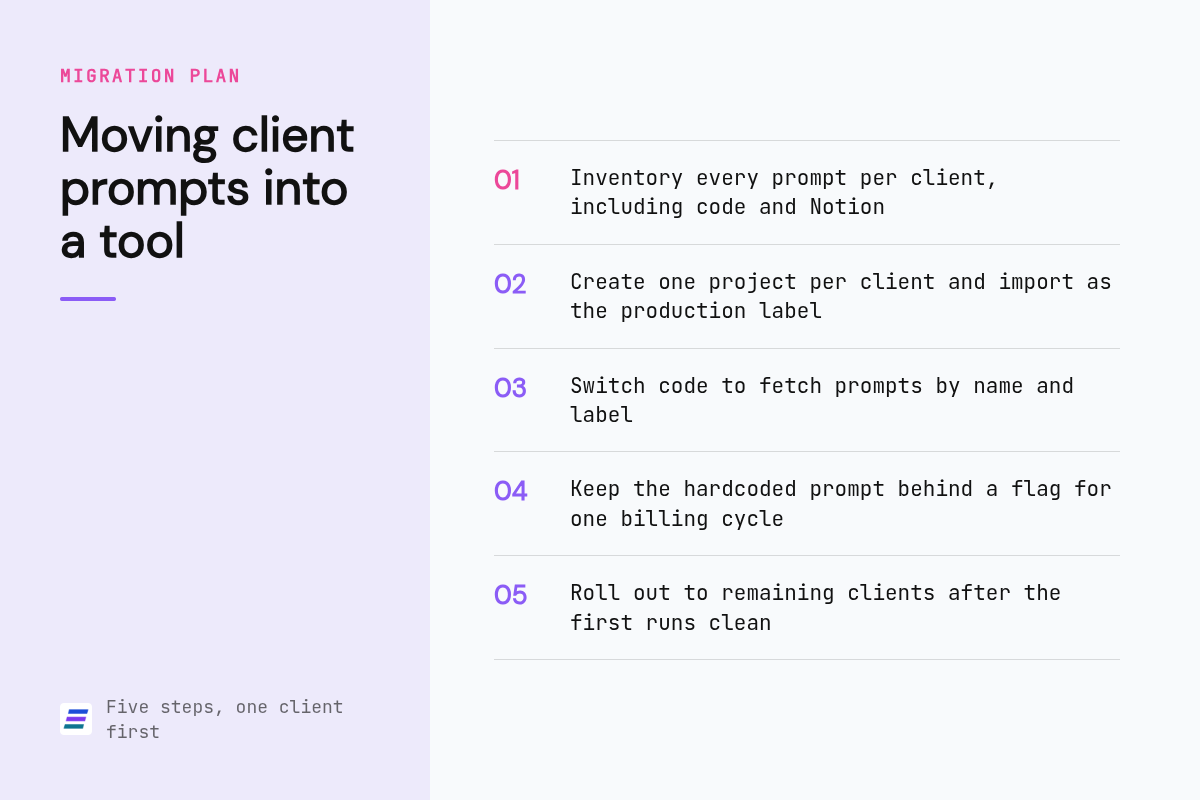
Start by inventorying every prompt per client, including the ones living in code constants, Notion pages, and shared docs. Load them into one project per client, tag the current live text as the production label, and switch application code to fetch by name and label.
A sensible rollout order is inventory in week one, import and label in week two, SDK switchover for one client in week three, and the remaining clients once that first switchover has run without incident. Keep the old hardcoded prompt in place behind a feature flag until the fetched version has served production traffic for a full billing cycle.
The decision by team size is simpler than vendor pages suggest. A solo consultant with no engineering support should pick PromptLayer or PromptHub and skip self-hosting. A two-to-five person agency with one developer can run Langfuse cloud or LangSmith Plus. A team past ten seats with client data residency clauses should evaluate self-hosted Langfuse or an Enterprise contract.
What should you look for when choosing a client prompt management tool in 2026?
Score each candidate on six things: versioning with environment labels, tracing linked to prompt versions, evals that can gate a release, per-client workspaces with roles, SDK support for your model providers, and compliance posture including self-hosting or data residency. Weight the two your contracts actually mention, usually access control and evidence of testing, above the rest.
The compliance column is no longer optional. The NIST AI Risk Management Framework, published by the U.S. National Institute of Standards and Technology, asks organizations to document, measure, and manage AI system changes, and a versioned prompt history with eval results is the simplest artifact that satisfies that expectation for a client audit.
Adoption pressure is real as well. McKinsey's State of AI research reports that a majority of surveyed organizations now use generative AI in at least one business function, which means more of your clients will ask who changed a prompt, when, and what the test results were. A tool that cannot answer those three questions will not survive the first difficult client call.
Finally, check SDK coverage against the providers you actually use. Langfuse, LangSmith, PromptLayer, and Braintrust all publish Python and TypeScript SDKs and support OpenAI and Anthropic calls, but framework depth varies, and LangSmith is clearly deepest for LangChain. Evident sits outside this layer entirely; it connects to Search Console, GA4, Google Business Profile, and review platforms rather than to model APIs.
How did we compare these options?
We compared published pricing pages, plan feature lists, documentation on versioning and labels, and each tool's scope as the vendor describes it in early 2026. Evident numbers come from our own pricing and crawler pages. For competitors, we only state a price where it is clearly published, and we ask you to confirm current figures before budgeting.
We did not run benchmark tests across tools, and we did not score user interfaces beyond whether a non-developer can edit and publish a prompt. Where a tool does something Evident does not, we say so, including in Evident's own entry. The story of why we built a measurement layer instead of another dashboard is on our about page.
How do you get started with Scalelabs?
Run a free Evident scan on one client website. It takes minutes, needs no credit card, and returns an EPI score across the search, AI, and human lenses with the top 5 critical findings. If the gap between what the client does and what AI assistants say is real, upgrade to Pro or Business at evident.so/scan.
What do people also ask?
What is a prompt management tool and how is it different from an observability or eval platform?
A prompt management tool stores prompt templates outside code with versions, labels, and rollback. An observability platform traces live requests, cost, and latency, and an eval platform tests outputs against datasets before release. Langfuse, LangSmith, PromptLayer, and Braintrust bundle all three to varying depths. Evident by Scalelabs does none of these; it measures how AI assistants, search, and people perceive each client.
Which client prompt management tool is best for agencies or consultants managing multiple clients?
For engineering workflows, pick Langfuse or LangSmith and create one project per client with its own member roles. For reporting what AI assistants say about each client, Evident by Scalelabs covers up to 10 websites on the Business plan at $799/mo with white-label reports and API access. Most agencies end up running one tool from each layer.
Which prompt management tools are free or open-source, and what are the free tier limits?
Langfuse is MIT-licensed open source and free to self-host, with a free cloud Hobby tier. LangSmith's Developer plan is free for one seat. PromptLayer, Braintrust, PromptHub, and Helicone publish free tiers with seat and request caps. Evident's Free plan is $0 for one site, one user, the top 5 findings, 2 competitor snapshots, and one re-scan per month with no exports or monitoring.
How do PromptLayer, Langfuse, LangSmith, and Braintrust compare on versioning, evals, and pricing?
All four keep numbered prompt versions with environment labels and support rollback by relabeling. Braintrust is strongest on evals, LangSmith is strongest for LangChain tracing, PromptLayer is easiest for non-technical editors, and Langfuse is the only one with an MIT open-source self-host option. LangSmith publishes Plus at $39 per seat per month; the others publish free tiers plus paid plans, so confirm current pricing on each vendor site.
Can I keep prompts organized per client with separate access controls and billing?
Yes for access, partially for billing. Langfuse and LangSmith use projects or workspaces with member roles, and PromptLayer uses workspaces with seats, so one project per client is the standard pattern. No tool bills per client natively; you attribute usage from per-trace cost data in your own invoicing. Evident separates clients by website, with up to 3 sites on Pro and 10 on Business.